🚀 Putting the controller online (onboarding)
Onboarding is the Fuzz controller's first connection to the Fuzz platform. It happens by itself as soon as the controller is powered, connected to the Internet and linked to a site in the Console. During onboarding, the controller registers with Fuzz, establishes its secure connection (Fuzz Secure Link) and installs the Fuzz software. Once finished, the site shows as Online and the Console can configure and monitor it.
This page covers the case of an Edge site (controller on site). For a Hybrid site, the gateway goes online the same way, with the differences described in The gateway of a Hybrid site. A Cloud site has nothing to put online on site.
✅ Prerequisites
| Item | Required |
|---|---|
| Controller | A controller registered by Fuzz in the name of your installer company (see Datasheet) |
| Role | Administrator or Operator of the site (or of the company), to edit Site Parameters |
| Site | A site created in the Console with the Edge hosting mode (see Create a site) |
| Installation | Controller mounted and powered, Ethernet cable on the upper port (see Physical installation) |
| Network | Outbound Internet access open (see Network connection and IT network) |
1. Link the controller to the site in the Console
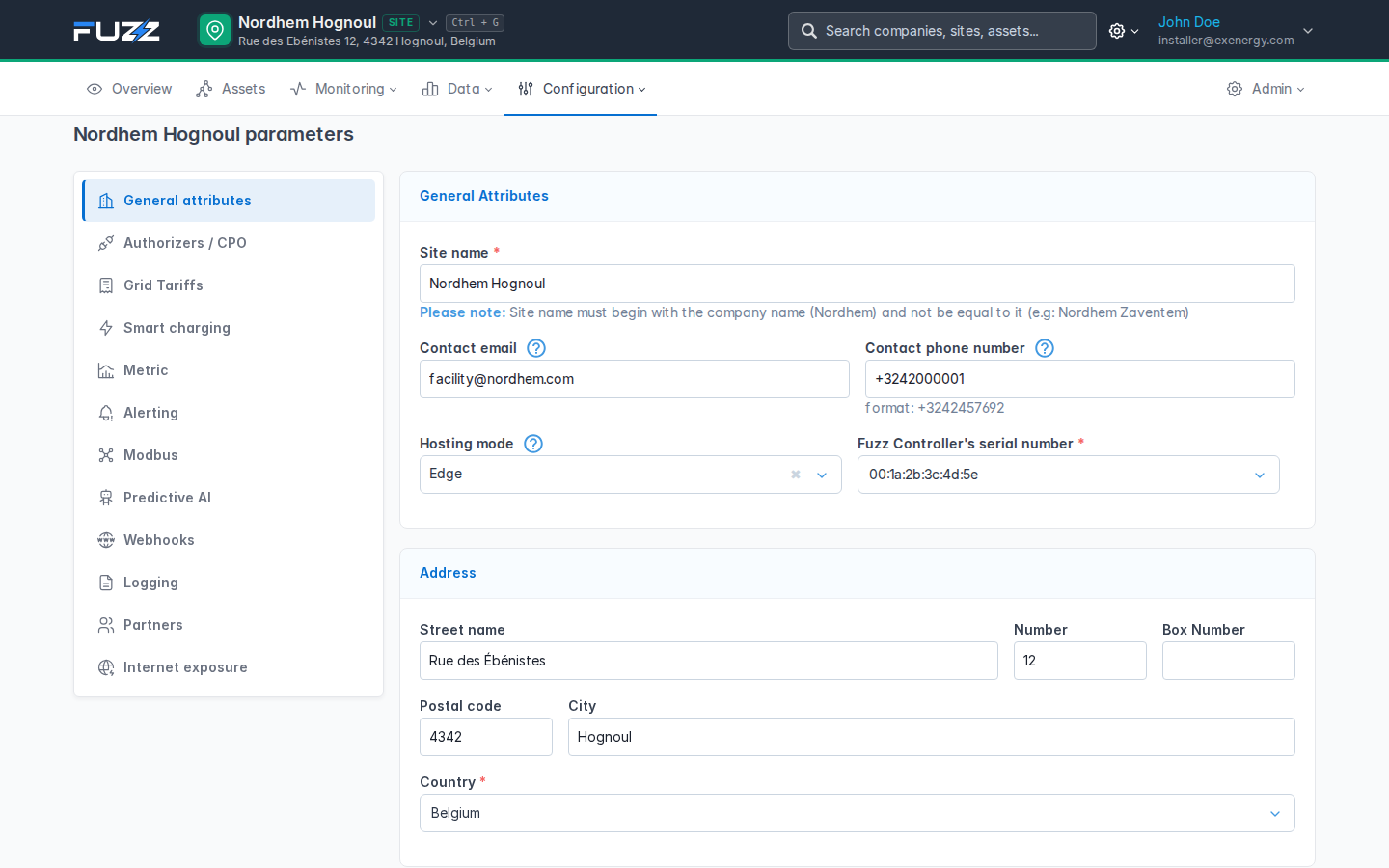
The controller only finishes its onboarding if it is linked to a site. The link is made by its serial number, which is the MAC address of its upper Ethernet port, in lowercase (for example 00:1a:2b:3c:4d:5e), printed on the box and on the controller's label (MAC0).
- Open the site, then Configuration > Site Parameters (or the Settings button on the site's Overview page).
- At the General attributes step, check that Hosting mode is Edge.
- In Fuzz Controller's serial number, choose the serial number of the installed controller.
- Save with Submit.
The same field appears at the General attributes step of the site creation wizard: you can link the controller as soon as you create the site.
The Fuzz Controller's serial number list only offers your company's controllers that have the same hosting mode as the site and are not linked to any other site. If the expected serial number does not appear, the controller is not yet registered by Fuzz, is already linked to another site, or is registered for another mode: contact Fuzz support with the controller's MAC address.
The order does not matter: you can link the controller before or after powering it on. If it is powered on before being linked, it waits and retries every 60 seconds.
2. Follow the onboarding
After power-up, onboarding starts automatically. If it fails (no Internet, site not linked…), it retries every 60 seconds, with no limit, until it succeeds. There is nothing to restart after fixing the cause.
Two places let you follow progress:
- On the controller, with the installer menu, entry 3. Onboarding status: the result changes from
Onboarding result: not completedtoOnboarding result: completed, and the log scrolls in real time. From a PC on the site network, openhttp://<controller-address>:1080; if the address is not known, go through the service port. - In the Console, at your installer company level: Monitoring > Controller > Logs, Onboarding logs tab (and Onboarding archive logs for the history). The steps sent by the controller appear there, from
Start Fuzz local controller onboardingtoThe Fuzz controller has been successfully onboarded. These logs are only visible to a company of type Installer; see Controller onboarding logs.
Onboarding downloads and installs the Fuzz software: allow a few minutes depending on the site's Internet speed. During this time, the controller may restart its services; do not cut the power.
3. Check that the site is online
Onboarding is successful when:
| Where | What you should see |
|---|---|
| Installer menu, 3. Onboarding status | Onboarding result: completed and Reverse SSH service: active |
| Console, the company's Onboarding logs | The Fuzz controller has been successfully onboarded |
| Console, site Overview page | Green dot and Up under the site name, Edge controller badge |
| Console, company, Sites table | Status column at Online |
| Console, the site's Monitoring > Controller > Health check | The controller and asset cards filled in (see Health check) |
A site's status is refreshed every minute: wait one to two minutes after onboarding ends. After that, every change saved in the Console is sent to the controller (see When does a change take effect?) and the Installer SSH console in the site's Admin menu becomes available.
The possible statuses of a site (Online, Not connected, Controller stopped, No status) are explained in Statuses.
🛠️ Onboarding messages and solutions
The following onboarding messages appear in Onboarding status of the installer menu and, for most of them, in the Console's Onboarding logs.
| Message | Cause | Solution |
|---|---|---|
Controller configuration not found in prod or beta (installer menu only) | Fuzz does not know this controller: it is not registered, or not with this MAC address | Contact Fuzz support with the upper port's MAC address |
Error contacting Fuzz auth (…) | Outbound HTTPS access blocked | Have the flows in IT network opened; test with Network diagnostics > Diagnostics |
Error: No site is currently associated with the local controller Fuzz. Please create the site first and associate it to this Fuzz controller | The controller is not linked to any site | Link it to the site in Site Parameters > General attributes, Fuzz Controller's serial number field; onboarding resumes by itself within the minute |
SSH keys already exchanged for this controller: reset them in Fuzz Console | The controller has already been put online once (card reinstalled, controller replaced, system reinstalled): for security, Fuzz refuses a second registration (error 409) | The reset is not available to installers: ask Fuzz support to reset the keys of the controller. Onboarding then succeeds by itself on the next attempt |
Error exchanging the SSH keys (HTTP …) | Key exchange interrupted (network, firewall) | Check Internet access; onboarding retries every 60 seconds |
Error returned when downloading Fuzz controller onboarding config: … | Fuzz refused the controller's request | Contact Fuzz support with the full message |
Other situations:
- The site stays Not connected although onboarding is
completed: the Fuzz Secure Link connection is not being established. Check 5. Reverse SSH status and that outbound port 22 is open (Network connection). - The site changes to Controller stopped: the controller is reachable but its software is not responding. Wait a few minutes after an onboarding; if it lasts, check 8. View Local Controller log and contact Fuzz support.
- Changing a site's controller, or replacing a faulty controller: contact Fuzz support. Do not link a second controller without their agreement.
👉 See also: The controller is offline, what should I check?, The controller cannot connect to Fuzz (onboarding), what should I check?