📄 Controller datasheet
The Fuzz controller (Local Controller) is the box installed at a customer's site in Edge hosting mode. It reads the meters, controls the charge points and assets, and stays in contact with the Fuzz Console. This page describes the hardware. To install it, see Physical installation.
A Hybrid site does not use this box but a small gateway: see The gateway of a Hybrid site. A Cloud site has no Fuzz hardware on site.
🖥️ Controller model and components
The Fuzz controller is a reComputer industrial computer from Seeed Studio, R1000 series. The controllers supplied have 4 GB of RAM and are generally these models:
- reComputer R1024
- reComputer R1124
| Item | Characteristic |
|---|---|
| Processor | Raspberry Pi Compute Module 4 (CM4), four ARM Cortex-A72 cores at 1.5 GHz |
| RAM | 4 GB |
| Storage | 16 GB eMMC |
| Operating system | Linux, preinstalled and maintained by Fuzz |
| Cooling | Passive (fanless) |
| Mounting | DIN rail (bracket supplied in the box) |
Manufacturer's documentation: reComputer R1100 flyer.
The controller software is installed and updated by Fuzz. The installer installs nothing on the box: they connect it, power it on and link it to the site in the Console (see Putting the controller online).
🔌 Controller ports and interfaces
| Interface | Use with Fuzz |
|---|---|
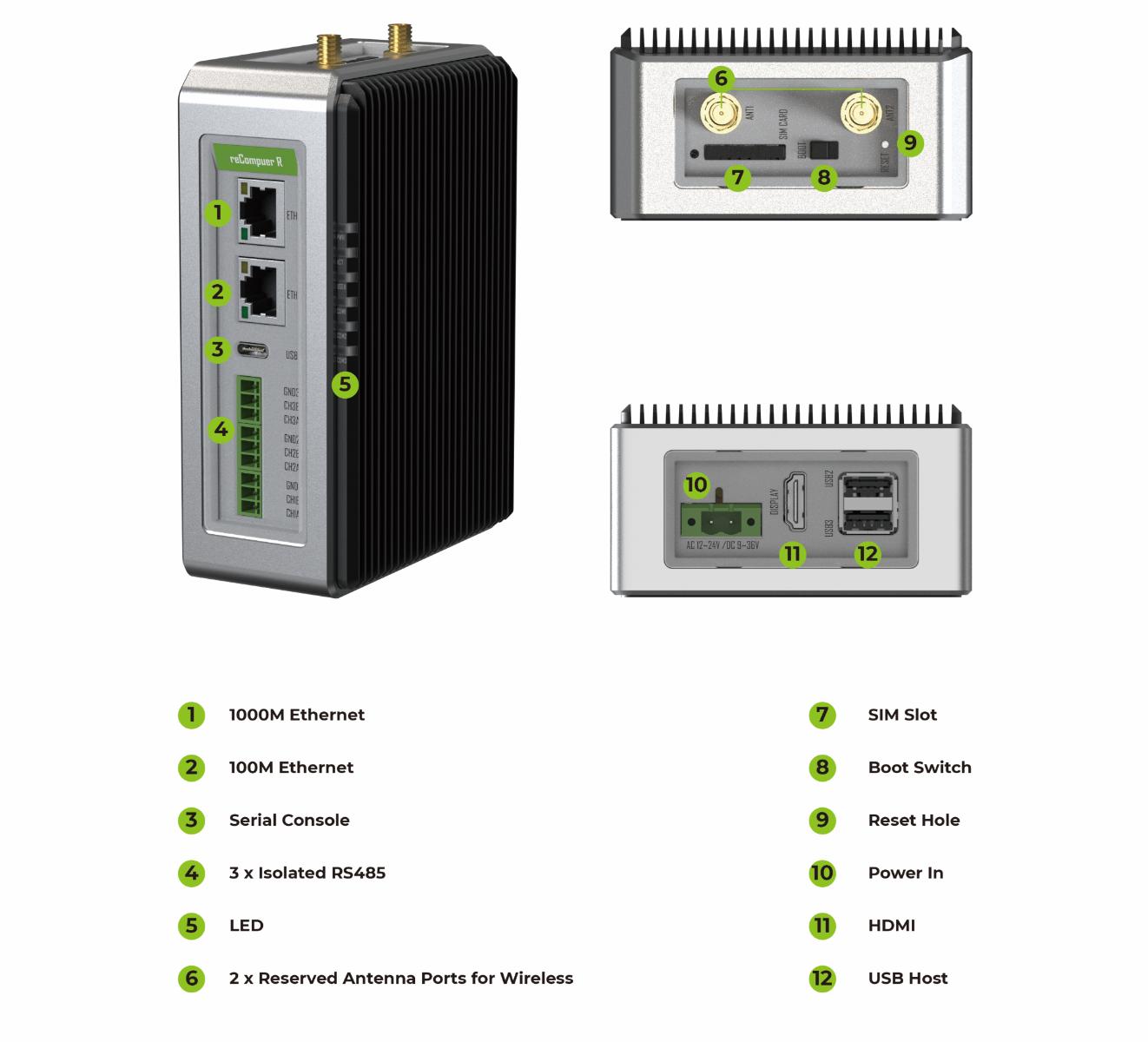
Ethernet 1 Gbit/s (upper port, eth0) | Main port: site network, Internet access, OCPP charge points, Modbus TCP assets. Its MAC address (marked MAC0 on the label) is the controller's serial number in the Console |
Ethernet 10/100 Mbit/s (lower port, eth1) | Service port: direct connection of a PC at the fixed address 169.254.254.1, to open the installer menu when the main port's address is not known |
| Isolated RS485 | Serial bus for Modbus RTU assets (meters, inverters, batteries) |
| USB 2.0 type A | USB-RS485 adapter if an additional RTU bus is needed |
| USB-C | Maintenance by Fuzz (system flashing) |
| HDMI 2.0 | Local screen, rarely used |
Some controllers can be fitted with a 4G modem. The installer menu then lets you change the SIM card's PIN code. The other 4G settings are not available to the installer: contact Fuzz support.
The installer menu only configures the main Ethernet port: connect the controller to the site network with an Ethernet cable. Network address details are in Network connection.
⚡ Power supply and operating conditions
| Item | Value |
|---|---|
| Supply voltage | 9 to 36 V DC or 12 to 24 V AC |
| Connection | Jack socket (adapter supplied) or power terminal block |
| Power consumption | About 2.9 W idle, 5.5 W under load |
| Operating temperature | -30 °C to +70 °C |
| Ingress protection rating | IP40: install in a switchboard or technical room, protected from water and dust |
After a power cut, the controller restarts by itself when power returns and resumes controlling the site without intervention.
📦 Getting a controller, licences and warranty
- Ordering: Fuzz sends one or more controllers to the installer after a commercial agreement. They cannot be bought in the Console.
- Registration: each controller is registered by Fuzz in the name of the installer company, with its serial number (the MAC address of the main port, in lowercase, for example
00:1a:2b:3c:4d:5e). It then appears in the Fuzz Controller's serial number field of a site's parameters. - Licences: the licences (time series database, Monitoring & Alerting, Energy Units) are attached to the controller and activated by Fuzz. See Licences and related features.
- Warranty: 2 years.
- Replacing a faulty controller: the procedure cannot be done in the Console. Contact Fuzz support, who register the new controller and attach it to the site.
👉 See: Putting the controller online, The controller and the hosting modes