🔧 Modbus assets (TCP and RTU)
Modbus is the industrial protocol that Fuzz uses to read the measurements of meters, inverters and batteries, and to send them setpoints (power limit, charge point current). The Fuzz controller queries the asset at regular intervals: it asks a question ("what is your power?") at a precise address, and the asset replies. This page explains the two variants, Modbus TCP and Modbus RTU, and how to fill them in in the Console.
✅ Prerequisites
| Item | Required |
|---|---|
| Hosting mode | Edge (the controller queries the assets on site) or Hybrid (the gateway relays the requests). A Cloud site cannot have a Modbus asset: it has no hardware on site |
| Model | The model of the asset must exist at Fuzz (Model field): see Compatible hardware |
| Role | Administrator or Operator of the site to create or edit an asset |
| Documentation | The asset manual: Modbus address (unit ID), and for RTU the speed, parity and stop bits |
🔀 Modbus TCP or Modbus RTU: the difference
| Modbus TCP | Modbus RTU | |
|---|---|---|
| Physical medium | The Ethernet network of the site (RJ45 cable, switch) | An RS485 serial bus: a pair of wires running from one asset to the next |
| How Fuzz finds the asset | Its IP address (for example 192.168.1.50), its port (almost always 502) and its unit ID | The serial port of the controller (or of the Hybrid gateway) and the unit ID of the asset on the bus |
| Settings to match | None, apart from the fixed IP address of the asset | Speed (baud rate), parity, stop bits and data bits identical on all assets of the bus and in the Console |
| Several assets | Each has its own IP address | All on the same bus, each with a different unit ID; Fuzz queries them one after the other |
| Distance | That of the Ethernet network | Up to about 1,200 m of bus (RS485 standard) |
Choose what the asset offers. If it offers both, prefer Modbus TCP: each asset is queried independently and diagnosis is simpler. A Modbus gateway (for example MetzConnect MR-GW, see Compatible hardware) lets you connect an RTU bus to the Ethernet network and then declare it as TCP.
With Modbus TCP, give each asset a fixed IP address (DHCP reservation or static address): if its address changes, Fuzz can no longer find it.
🧵 Wire an RS485 bus (Modbus RTU)
A Modbus RTU bus follows the general RS485 rules:
- A shielded twisted pair connects the A and B terminals of all assets (depending on the brand: D+ / D−, Data+ / Data−, TX+ / TX−). Also connect the reference ground (GND or COM) when the asset has one.
- Line wiring (daisy chain): the cable runs from one asset to the next. No star topology and no long branches.
- 120 Ω termination resistor at both ends of the bus only (many assets have a switch or a jumper to enable it).
- The shield is connected to earth at one end only.
- At most 32 assets per bus segment, over about 1,200 m in total.
- All assets on the bus have the same speed, the same parity and the same number of stop bits, and each has a different unit ID.
On an Edge site, the bus is connected to the RS485 port of the controller, or to a USB-RS485 adapter plugged into its USB port. On a Hybrid site, it is connected to the RS485 port of the gateway (see The gateway of a Hybrid site).
Manufacturers do not all use the same convention for A and B. If no asset responds although the settings are correct, swap the two bus wires on the controller side: this creates no risk.
🖥️ Fill in a Modbus TCP asset in the Console
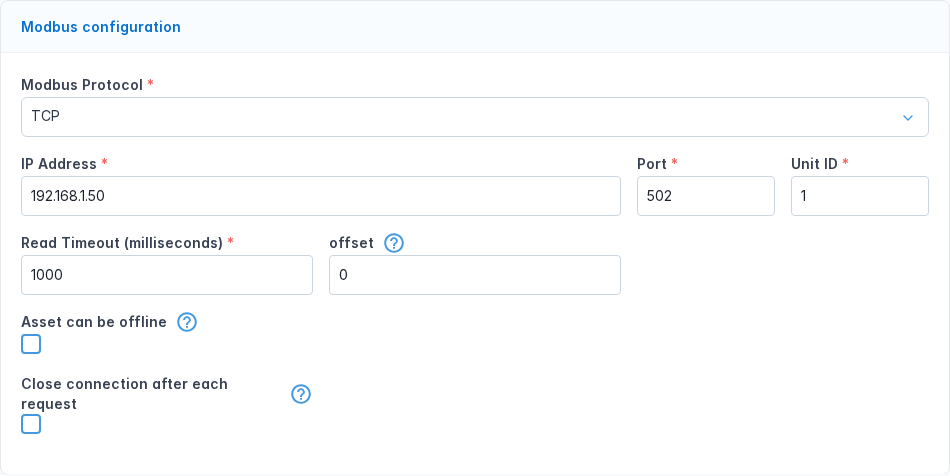
In the asset form (meter, photovoltaic, battery, charge point, fridge, generic asset), choose the Modbus protocol, the Model, then fill in the Modbus configuration card with Modbus Protocol = TCP:
| Field | Meaning | Default |
|---|---|---|
| IP Address | Fixed IP address of the asset, for example 192.168.1.50 (on a Hybrid site: numeric IPv4 address required) | 192.168.0.1 |
| Port | Modbus TCP port of the asset | 502 |
| Unit ID | Modbus address of the asset (see Unit ID) | -1 |
| Read Timeout (milliseconds) | Maximum time to wait for a response | 1000 |
| offset | Offset added to the register addresses; rarely used (several assets behind a central asset) | 0 |
| Asset can be offline | Tick if the asset can normally be switched off (inverter at night): Fuzz then does not report it as an error | Unticked |
| Close connection after each request | Closes the connection after each question; useful when several assets are behind a single central asset that handles simultaneous connections poorly. Slight performance cost | Unticked |
Example for the main meter of a site: IP Address 192.168.1.50, Port 502, Unit ID 1.
🖥️ Fill in a Modbus RTU asset in the Console
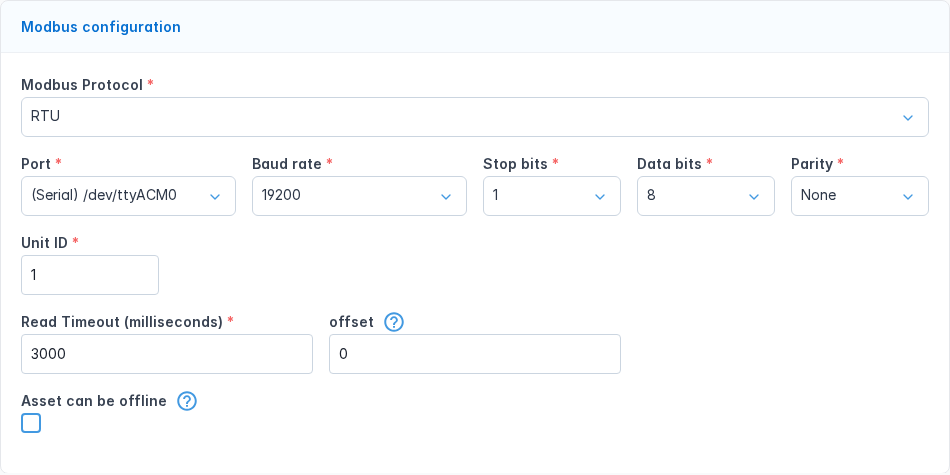
With Modbus Protocol = RTU, the Modbus configuration card offers:
| Field | Meaning | Values | Default |
|---|---|---|---|
| Port | Serial port the bus is wired to | (USB) /dev/ttyUSB0 (USB-RS485 adapter), (Serial) /dev/ttyACM0, (Serial) /dev/ttyAMA2 (serial ports of the controller), (RS485) /dev/rs485 (RS485 port of the gateway of a Hybrid site) | (Serial) /dev/ttyACM0 |
| Baud rate | Bus speed, identical on the asset | 9600, 19200, 38400, 115200 | 19200 |
| Stop bits | Stop bits | 1 or 2 in practice | 1 |
| Data bits | Data bits | 8 | 8 |
| Parity | Parity | None, Odd, Even | None |
| Unit ID | Modbus address of the asset on the bus | 0 to 255 | -1 |
| Read Timeout (milliseconds) | Maximum time to wait for a response | 3000 | |
| offset | Offset of the register addresses, rarely used | 0 | |
| Asset can be offline | The asset can normally be switched off | Unticked |
All assets declared on the same Port must have the same Baud rate, Data bits, Parity and Stop bits. On a Hybrid site, the Console refuses to save otherwise.
To find out which port matches the RS485 terminal block of the Edge controller, ask Fuzz support if the controller label does not say.
🔢 Unit ID: the Modbus address of the asset
The Unit ID (also called slave ID, slave address or Modbus address) identifies the asset that must respond. With RTU, it distinguishes the assets on the same bus; with TCP, it is often 1, but some assets (data managers, gateways) give a different address to each device they group. The value is read in the asset menu or in its manual.
| Value entered | What Fuzz does |
|---|---|
0 to 255 | Queries this address |
-1 (default) | Uses the default address provided by the asset model; if the model does not provide one, uses 1 |
Always enter the real address when you know it. Two assets on the same RTU bus must never have the same unit ID: they would respond at the same time and neither would be read correctly.
⚙️ Modbus actions and sending setpoints
Depending on the asset type, the Supported actions card of the form shows what Fuzz is allowed to write to the asset:
| Type | Actions offered |
|---|---|
| Charge point controlled using Modbus | Set current (Smart charging), Start transaction, Stop transaction, Remote start transaction, Remote stop transaction (ticked by default at creation), Prevent plug and charge, Preparing |
| Photovoltaic | Set power (flexible asset): Fuzz can limit production (unticked by default) |
| Battery | Set power: Fuzz controls charging and discharging (ticked by default at creation) |
An unticked action is never sent: the asset is then only measured. The Periodic setpoint sending card, Execution interval (ms) field, sets how often the setpoint is resent: 0 = site value (Smart charging step of the site parameters), -1 = no periodic sending.
🔍 Check that a Modbus asset responds
After Submit, the configuration is sent to the controller (see When does a change take effect?). Then:
- Open Assets, State tab: the asset must be Online, with the Modbus protocol and values in P (W), I1 (A), I2 (A), I3 (A).
- Open the asset: the real-time measurements card (Refresh live readings) shows its values.
- To read a specific register, use the site Modbus tool, Configuration > Tools, Modbus client tab, or the Toolkit tab of the asset (Administrator and Operator roles): see OCPP and Modbus test tools.
- From the controller, the Network diagnostics > Test remote connectivity entry of the installer menu checks that port
502of the asset is reachable.
An asset is declared offline when it has not responded for Offline Threshold (seconds) (30 s by default) and after Minimum number of failures failures (3 by default, from 1 to 10), set at the Monitoring step of its form.
🛠️ Common Modbus problems
| Symptom | Probable cause | Solution |
|---|---|---|
| When saving the asset: "A Cloud site cannot reach a Modbus asset: nothing is installed on site. Choose another protocol (MQTT, API) or use an Edge or Hybrid site." | Cloud site: nothing on site to query a Modbus asset | Choose the MQTT or API protocol if the asset supports it, otherwise move the site to Edge or Hybrid (contact Fuzz support) |
| TCP asset offline | Wrong IP address, address changed (DHCP), port closed | Fix the address of the asset; test the port with Test remote connectivity |
| TCP asset reachable but no values | Wrong Unit ID, wrong Model | Check the Modbus address in the asset menu; check the model chosen |
| No RTU asset responds | A and B swapped, wrong Port, different speed or parity | Swap A and B; align Baud rate, Parity, Stop bits with the asset |
| Only one RTU asset does not respond | Duplicate or wrong unit ID | Give a unique unit ID to each asset on the bus |
| Inconsistent values (decoded incorrectly) | Model not suited to the version of the asset | Contact Fuzz support with the reference and the register table |
| Asset reported offline every night | Inverter switched off without production | Tick Asset can be offline |
| Slow readings with many RTU assets | The assets of a bus are queried one after the other | Increase the bus speed, split across several buses, or switch to TCP |
👉 See also: A Modbus asset is offline, Settings common to all assets