🔌 OCPP configuration of charge points
A charge point connects to Fuzz with the OCPP 1.6 JSON protocol (also called OCPP 1.6J or OCPP-J 1.6). In the charge point's configuration, you enter the address of the OCPP server: it is the site's Fuzz controller. The charge point then opens the connection to Fuzz itself; Fuzz can then read its measurements, control its current (smart charging), authorize badges and relay traffic to a charging operator (CPO) if the site uses one.
This page explains which address to enter and how the charge point's identity is recognised. The per-brand procedures (Alfen, Easee, EN+, Mennekes, Schneider, Smappee) apply these rules on each manufacturer's screen.
✅ Prerequisites
| Item | Required |
|---|---|
| Charge point protocol | OCPP 1.6 JSON over WebSocket. OCPP 1.5, OCPP 2.0 and OCPP 2.0.1 are not supported by Fuzz |
| Console | The charge point declared in the site topology: a station (the box) and one charge point per connector, protocol OCPP (see Add and configure a charge point) |
| Role | Administrator or Operator to create the charge point in the Console; any user who sees the charge point can read its OCPP URL |
| Network, Edge site | The charge point and the controller on the same local network, controller with a fixed IP address (see Network connection) |
| Network, Hybrid or Cloud site | Internet access for the charge point (Ethernet or 4G) |
🧭 Understanding the Fuzz OCPP URL
The Fuzz OCPP URL always has the same form: a start that designates the Fuzz server, then ocpp16, then the site identifier, then the station identifier:
| Part | Example (site Nordhem Hognoul, station Borne P1) | Where it comes from |
|---|---|---|
| Server | ws://192.168.1.10:8080 (private) or wss://ocpp.fuzz.energy (public) | Address of the controller on the site network, or Fuzz public server |
| Version | ocpp16 | Always ocpp16 (with two "p") |
| Site identifier (site UID) | t1d1vauf | Visible in the Console address: /sites/t1d1vauf/... |
| Station identifier | yp6u00td | The station's UID in Fuzz, or the Serial number entered on the station |
There are two URLs, depending on the path the charge point takes to reach Fuzz:
- Private URL (Edge sites only):
ws://<controller-ip>:8080/ocpp16/<siteUid>/<stationUid>. The charge point connects to the controller through the site's local network. Example:ws://192.168.1.10:8080/ocpp16/t1d1vauf/yp6u00td. - Public URL:
wss://ocpp.fuzz.energy[/<secret key>]/ocpp16/<siteUid>/<stationUid>. The charge point connects over the Internet, in an encrypted connection (wss). Example with the secret keyk7Qm2vX9pL4w:wss://ocpp.fuzz.energy/k7Qm2vX9pL4w/ocpp16/t1d1vauf/yp6u00td.
The private URL is preferred on an Edge site: control continues even if the Internet is cut.
📋 Find a charge point's OCPP URL in the Console
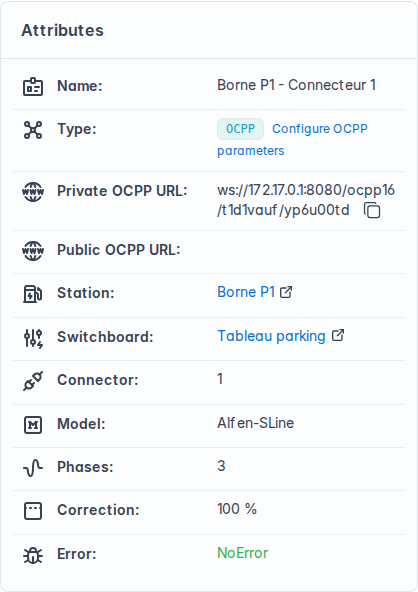
- Open the site, then Assets, and click the charge point (for example Borne P1 - Connecteur 1).
- In the Overview tab, Attributes card, read:
- Private OCPP URL: the private URL, already completed with the controller's current IP address (Edge sites only);
- Public OCPP URL: the public URL, with the site's secret key if there is one. This line is empty as long as connections over the Internet are not allowed for the site.
- Click the copy icon to the right of the URL to copy it, then paste it into the charge point's configuration tool.
The two connectors of the same station have the same URL: it is the station (the box) that connects, not each connector.
If the Console does not yet know the controller's address (controller offline), the private URL shows <ip_controller> instead of the address: replace it with the controller's fixed IP address.
🔗 Use the public URL (over the Internet)
The public URL is used when the charge point cannot reach the controller over the local network:
- Hybrid or Cloud site: this is the only possibility, connections over the Internet are always open and the Console does not display a private URL;
- Edge site: charge point on another network, charge point on 4G, or charge point configured from its manufacturer's online portal (Smappee, for example). You must first allow these connections in Configuration > Site Parameters, Internet exposure step: tick Allow OCPP connections from the public internet and enter a long, random OCPP URL Secret Key. The key is inserted in the URL right after
ocpp.fuzz.energyand makes the address impossible to guess.
The full procedure is in Internet exposure (public OCPP) and Connect a charge point over the Internet.
🪪 Charge point identity: station UID or serial number
In OCPP, each charge point has an identity (called Charge Point ID, ChargeBoxIdentity, Customer Ident. number or simply serial number depending on the manufacturer). It is the last element of the URL. Fuzz recognises the station if this last element is:
- the station's UID in Fuzz (for example
yp6u00td, visible in the URL displayed by the Console), or - the Serial number entered on the station in the Console (for example
EXE-ST-0001).
Two cases depending on the charge point's configuration screen:
| The charge point… | Enter in the server address | And in Fuzz |
|---|---|---|
| has a full URL field and no separate identity field | The full URL copied from the Console: ws://192.168.1.10:8080/ocpp16/t1d1vauf/yp6u00td | Nothing more |
| has a separate identity field and adds its identity itself at the end of the URL (case of Alfen, Mennekes, EN+) | The URL without the last part: ws://192.168.1.10:8080/ocpp16/t1d1vauf | The station's Serial number field = the identity configured on the charge point (for example ACE0012345). You can also set the station's UID as the identity on the charge point |
The Serial number is entered in the station's window (site topology, station, Name, Serial number, CPO Station ID, Authorizer / CPO). Two stations of the same site must not have the same serial number. A station whose identity matches neither its UID nor its serial number is refused by Fuzz: the charge point stays offline.
⚙️ Other settings on the charge point
| Charge point setting | Value for Fuzz |
|---|---|
| OCPP version / mode | OCPP 1.6 JSON (OCPP-J 1.6, WebSocket) |
| Security profile | Without password: Fuzz asks for neither an HTTP (Basic) password nor a client certificate. On the private URL, choose the profile without security (often 0); on the public URL, the connection is encrypted by wss and protected by the secret key |
| HTTP Basic password | Leave empty |
| WebSocket proxy | Leave empty |
| Charge point IP address | DHCP is possible: the charge point is the one that connects. A fixed address is recommended to open its web interface remotely |
After any change, save the configuration in the manufacturer's tool, then restart the charge point so that it reconnects with the new address.
In the Console, the OCPP protocol, the Model (or Other with a Model name if the model is not offered) and the Offline grace period (seconds) are set in the Charge point protocol step of the charge point (see Add and configure a charge point). The chosen model applies the brand-specific settings: see Vendor configs.
🔍 Check that the charge point is connected
After the charge point restarts:
- In Assets, State tab, the charge point's status changes to Online (or to an OCPP status such as Available, Charging) with the OCPP protocol.
- In the site's Monitoring > Controller > Logs, or in the charge point's Logs tab, a
New websocket connection from stationmessage appears, followed by the charge point's OCPP messages (BootNotification,StatusNotification,Heartbeat). - On the charge point page, Charge point actions > Ask charge point to trigger a message lets you request a
StatusNotificationto test the exchange in both directions.
When the charge point disconnects, Fuzz keeps its status during the Offline grace period (0 seconds by default, unless the model sets otherwise) then changes it to Unavailable.
🛠️ The charge point does not connect
| Symptom | Likely cause | Solution |
|---|---|---|
| The charge point stays offline, no message in the logs | Wrong IP address, port 8080 filtered, ocpp16 misspelled (occp16) | Copy the URL again from the Console; test access to port 8080 from the charge point's network |
| The charge point stays offline on an Edge site after a router restart | The controller's IP address has changed | Set the controller's address to fixed (Network connection) |
| The connection is refused | The charge point's identity matches neither the UID nor the Serial number of the station, or the site identifier is wrong | Compare the identity configured on the charge point with the station in Fuzz |
| The public URL does not appear on the charge point page | Connections over the Internet not allowed for this Edge site | Enable Internet exposure in the site parameters |
| The charge point connects then disconnects in a loop | Charge point in OCPP 2.0 or security profile with a password | Switch the charge point to OCPP 1.6 JSON, profile without password |
👉 See also: My charge point stays "Offline", what should I check?, Charge point page and remote actions